


Picture a brand with twelve locations: corporate publishes a monthly blog post and a promotional email, three location managers post whenever they find the time, one location page hasn’t been touched in a year, and two city pages differ only by the city name. Nobody planned this. It’s what happens when content grows faster than the system behind it.
A content calendar for multiple locations fixes this by doing three things: it separates what is centralized from what is local, it runs on a defined workflow with clear approvals, and it measures results by location instead of in aggregate. This article shows you how to build each of those pieces, so your locations can publish with confidence and your leadership team can see what’s working.
Why Multi-Location Content Planning Breaks Down
Most multi-location content problems start as a handoff problem. Corporate owns the brand, but not the neighborhood. Location managers know the neighborhood, but are busy running a business. Without a shared plan, each side fills the gap in its own way.
The symptoms are easy to recognize: locations post at different cadences and levels of quality, corporate becomes a review bottleneck, and drafts sit for days. Someone might even clone a city page to save time, and now two pages compete for the same searches. When leadership asks which location’s content produces calls, orders, or visits, nobody can answer.
This matters for more than tidiness. Search engines and AI-driven search tools favor content that is specific, local, and helpful, while thin duplicates dilute your visibility. Brand and compliance risk grow with every location that publishes independently, especially in regulated categories like cannabis, where advertising rules vary by jurisdiction.
Wasted production also raises your customer acquisition cost (CAC), which is your total sales and marketing spend divided by the new customers it brings in. Content that’s produced but never found (or never tied to a result), adds to the numerator and nothing to the denominator.
A Four-Phase System for Running Your Calendar
None of this comes from a lack of effort. It comes from a lack of structure, and structure can be built. Running a content calendar for multiple locations well takes four connected phases, each laying the groundwork for the next. Below, each one also includes the pitfall that most often trips teams up at that stage. And if some content pieces already exist for your business, still start at the beginning– jumping ahead to tools or tracking phases before ownership is settled is how a calendar turns into a spreadsheet nobody opens.
Phase 1: Tier Your Content & Assign Ownership
A content calendar for multiple locations starts with a simple question: what kind of content is this? A national seasonal campaign and a post about a Saturday event at one store have different owners, different risks, and different review needs, so they shouldn’t share one process.
Sort your calendar into three tiers: brand-wide, regional, and location-specific. Each tier gets an owner, a rhythm, and a level of review that fits its risk.
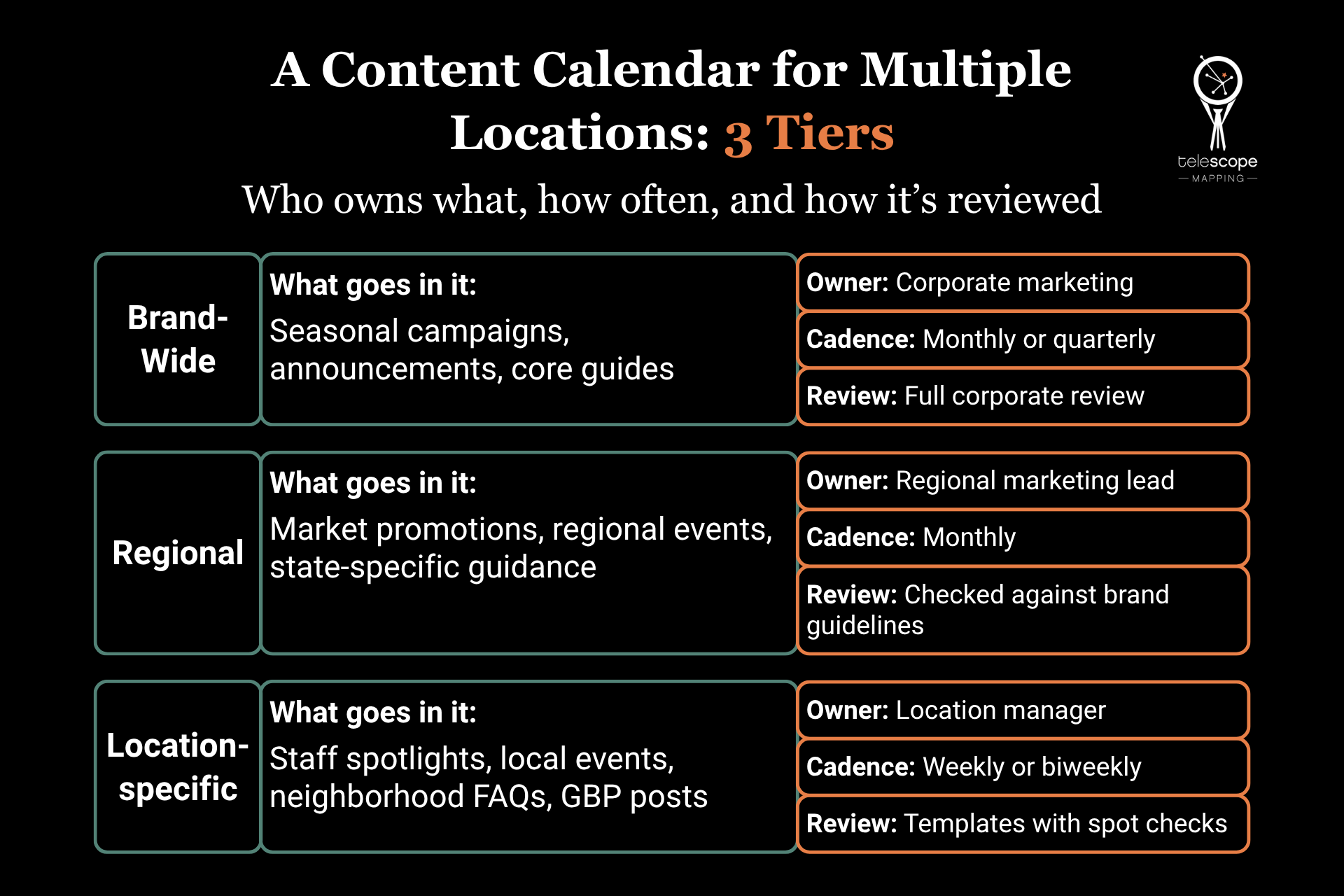 These cadences are starting points. Adjust them to your team’s capacity and to how much your customers actually search and engage locally.
This is also where many brands go wrong, either by giving every location the same calendar or by having no calendar at all. The first produces a rigid sameness that ignores what makes each market different, and the second produces chaos, with no way to spot gaps or overlaps. A better approach is to fix the brand-wide backbone first, then reserve defined slots for local content, so locations know exactly where they have freedom and where they don’t.
Phase 2: Build the Master Calendar, Workflow, & Approvals
Once the tiers exist, they need a home. A content calendar for multiple locations only works as a single source of truth: one shared view that anyone can filter by location, tier, and channel. Several competing spreadsheets won’t hold.
Anchor the master calendar with the seasonal moments, launches, and promotions every location plans around, then layer local events on top. For a twelve-location brand, for example, a typical month might show one corporate guide and one campaign at the top, a couple of regional promotions for the markets they apply to. Additionally, for each location, a weekly Google Business Profile (GBP) post and one scheduled refresh of a local page would also be sensible. When organized this way, anyone can see at a glance where there’s a gap or a pile-up.
Next, define the production workflow. Every piece moves through the same stages: brief, draft, review, publish, and update, and each stage needs a named owner and a turnaround time. “Corporate will review it” isn’t a workflow; “the regional lead reviews within two business days” is. And if your team lacks the capacity to draft, Telescope Mapping’s content development and marketing services can fill that gap without changing the process around it.
The approval process is where most calendars stall, so the goal is to make routine content fast and high-risk content careful. Build pre-approved templates and a claims library: a shared set of approved descriptions, offers, disclaimers, and compliance language. Local managers can then publish routine posts without waiting for corporate sign-off, while promotions, pricing, health or product claims, and anything touching regulated advertising rules go through a defined review path. As for tools, a shared project board, a filtered spreadsheet, or a dedicated content platform can all work, as long as everyone uses the same one.
The usual failure here is routing everything through a single approver. Content stalls, local managers start working around the process, and quality varies anyway because the workarounds are invisible. Tier your approvals by risk instead, and set a response time on every review step, so a late approval becomes a visible problem rather than a silent one.
Phase 3: Localize Without Duplicating
Duplicate content is one of the biggest obstacles to getting your location pages found. When dozens of location pages share nearly identical text, search engines have a harder time deciding which one to show, and your own pages end up competing with each other. Pages that exist only to catch searches for different cities can also look like what search engine guidelines call ‘doorway pages,’ which is another reason to give each one real substance.
The fix starts with a shared template that requires local inputs. A page or post shouldn’t be approved until it includes something only that location can provide:
- Real staff names and photos
- The services or inventory actually available there
- Neighborhood references and directions a local would recognize
- Reviews and questions from customers at that location
Decide up front which topics belong on one central page and which deserve local versions. For example, a guide to how your service works usually belongs in one place, while hours, parking, local offers, community involvement, etc. belong on each location’s page– ideally marked up with LocalBusiness schema, a standard format that helps search engines read those details cleanly. When the same content must appear in more than one place, such as a syndicated article, use a canonical tag: a line of code that tells search engines which version you prefer. If you’d like help with the technical side, Telescope Mapping’s hosting and website management services can support everything from location pages to schema.
The shortcut to be avoided here is cloning one page and swapping the city name. Those pages compete with each other or get ignored, and customers get nothing useful from them. Instead, require a minimum amount of genuinely local substance before any page is approved, and treat a page that can’t meet it as a candidate for consolidation.
Phase 4: Measure Content Performance by Location & Adjust
A content calendar for multiple locations that you can’t measure becomes a habit instead of a strategy. Give every piece of content a label for its tier and its location so your analytics can segment results. In Google Analytics, that usually means consistent URL structures, campaign parameters (the UTM tags added to links), and location identifiers set up before the content ships.
Then measure what the business cares about. Traffic is a starting point, but calls, direction requests, form submissions, online orders, and revenue per location tell you whether content is doing its job. A location with modest traffic and strong call volume may be outperforming one with twice the sessions.
Put these numbers on a shared dashboard and review them on a regular rhythm: monthly for results, and quarterly for planning. Each review should answer three questions in plain language: what changed, why it changed, and what happens next. Use the answers to decide what to repeat, update, or retire, and feed them into the next quarter’s calendar. Compare every location against the same metrics each cycle, and against its own past performance too, since markets differ in size. That keeps comparisons fair and decisions grounded.
The pitfall here is judging the calendar by posting volume or total sessions, which gives you busy output that can’t be tied to revenue and no basis for moving effort where it pays off. Set location-level goals instead, and tie the calendar to them.
Running a Content Calendar for Multiple Locations: FAQs
How much time does this take, and what should stay in-house?
It depends on your location count, but a typical setup has one coordinator owning the master content calendar and one designated contact per location who spends a few hours a month on local input. Keep brand voice, approvals, and local knowledge in-house. Outsourcing makes the most sense for production capacity and for analytics setup, where specialized skills save time.
How do we handle locations with very different markets or regulations?
Build the differences into the system instead of policing them afterward. It’s often beneficial to keep a claims library with jurisdiction-specific language, and put locations in stricter markets on a stricter review path. And be sure to have whoever’s in charge of content confirm the rules for each jurisdiction, since requirements can change frequently.
What do we do about the content that already exists across locations?
Audit it before you create anything new. Sort each page into keep, update, consolidate, or retire, and start with the locations that drive the most revenue. Near-duplicate pages can often be merged into one stronger page with the right redirects or canonical tags.
Starting Your Content Calendar for Multiple Locations
Before you add a single post to the calendar, confirm you can see content results by location. That visibility decides what the calendar should contain, which locations need more support, and which content has earned a repeat.
And if you’re not sure your current tracking setup can answer that, Telescope Mapping can help. Our data and tracking services check whether your analytics, listings, and reporting can show results location by location, and point out what to fix before you build anything. Once that visibility is in place, planning gets much easier: you’ll know where to focus first, what to repeat, and what to retire. Reach for a free consultation today, and we’ll help you start your calendar on solid ground.